


Amex
4.815.04K Reviews
App Specs
- Version
- 7.32.2
- Updated On
- License
- Free
- Downloads
- 10,000,000+
- Developer
- American Express
- Categories
- Finance
- Platform
- Android, iOS
Screenshots
 Analysis by AppCompare
I find a card-management app most useful when it lets me answer a few practical questions quickly: What has cleared? What payment is due? Is there anything I need to check before I use my card again? Amex is built around those everyday account tasks, with access to balances, payments, rewards, and other card details in one place. It is a finance app from American Express, and it makes the most sense for people who already use one of the company’s cards and want a convenient way to manage it from a phone.
The app is free, rated for Everyone, and has been available since 2010. Its current version is 7.29.0, and it requires Android 12 or later. Its 4.9 average from around 85,000 ratings and more than 10 million installs suggest that many customers rely on it, though those figures cannot tell me whether it will suit a particular person’s needs. I would judge it mainly by how easily it helps you complete routine card tasks, and by whether its layout works comfortably for the way you use your phone.
Finding key account details without extra effort
On opening the app, I would expect the most important account information to be the easiest to reach. The experience is designed to put card management in one place: checking a balance, reviewing account activity, making a payment, and looking at rewards are the sorts of jobs I would use it for most often. That focus can be a real help when I only have a moment to check something, rather than time to sit down at a computer.
Readable labels and a predictable route between account sections matter more than decorative polish in a finance app. I want to know which card or account I am viewing before acting, and I want payment and reward information to be clearly separated enough that I do not confuse one task with another. A quick glance is useful, but I would still pause to confirm the account and payment details before submitting anything important.
For someone who manages more than one eligible card, keeping account access within the same app can reduce the need to sign in and out of separate services. That is particularly helpful when checking which card has a pending payment or comparing recent activity. I would make a habit of confirming the selected card each time I switch tasks; convenience is valuable, but it should not replace a careful check before making a payment or redeeming a benefit.
Comfort, control, and the way you interact
Using a finance app involves more than reading a balance. People may be holding a phone with one hand, using it in bright light, enlarging text at the operating-system level, or relying on screen-reading and other device settings. I would try the most common tasks early—checking a transaction and finding the payment area—to see whether the labels and controls remain comfortable and understandable in my own setup. The best test is not how polished a screen looks, but whether I can complete a task without losing my place.
Biometric sign-in can make repeated visits less cumbersome for people whose device supports it and who prefer that method. It also avoids the daily chore of typing a password, though I would keep account recovery details secure and know how to sign in if biometric access is unavailable. A familiar login method is convenient; it is not a reason to share a device or leave a signed-in account open where others can access it.
Worth Reading Before You Choose

Flipboard Shows What News Apps Must Do Beyond the Feed

Switching to Android Auto Means Rethinking Your Driving Routine

Google Calendar Makes a Crowded Week Easier to Manage

Ludo King Makes the Most of the Minutes Between Plans

Baby Panda World Brings Quick Play to Modern Phones, but Its Game Library Feels Busy

ESPN’s Live Game View Makes Following Close Games Easier
Notifications can also support different routines. A purchase alert may help someone who checks their account in short bursts, while a person who finds frequent prompts distracting may prefer to review their notification settings and keep only the alerts they find useful. I would treat an alert as a cue to check the account, not as a complete record of spending. For a decision about a bill or a disputed transaction, I would open the account and review the relevant details directly.
Access in the middle of an ordinary day
A realistic use case is checking a recent purchase while waiting in line, then making a payment during a lunch break. On a small screen, I would keep the task narrow: verify which card is open, check the relevant amount, and finish only the action I intended. This is where a dedicated card app can feel more direct than a general budgeting tool, because the immediate job is account management rather than building a complete picture of every household expense.
Rewards are another reason to open the app in context. If I am already checking my account, it is convenient to look at available rewards before deciding whether to use them. I would compare the redemption choice with what I actually want—such as a statement credit or a travel-related option—rather than redeeming simply because a choice is visible. Keeping rewards information close to card activity is useful, but it does not automatically make every redemption equally valuable for every person.
For travel or a busy day away from home, phone access can be reassuring when I need to review activity or manage a card. It is still sensible to plan for practical limits: a phone may be low on battery, connectivity may be poor, or a sign-in step may take longer than expected. I would not make the app my only way to remember a due date or handle an urgent account issue. A calendar reminder or another safe backup can be useful if missing a payment would create stress.
Where it fits among finance apps
The main comparison is with a bank’s general-purpose app or a separate budgeting service. A banking app may be the more natural place to manage accounts across different providers, while a budgeting app may give a broader view of income and spending. This app is a more focused choice when the task is to manage an American Express account: review card activity, make a payment, or check rewards without first sorting through unrelated financial products.
That focus is also a limitation. If you want one dashboard to combine cards from several issuers, track cash spending, and plan a household budget, you may still need another tool. I would not assume that a card’s transaction categories replace a personal budget: category labels can help spot patterns, but you may want to compare them with your own records before making a serious spending decision.
The app is most appealing to existing American Express customers who value mobile access and regularly check their accounts. It is less compelling if you do not hold an eligible account, rarely use a smartphone for financial tasks, or need a cross-provider money manager as your main tool. The app itself is not a substitute for choosing a card that fits your finances; it helps manage the account you already have.
Practical checks before relying on it
When making a payment, I would confirm the amount, payment date, and selected account before completing the action. If using autopay, I would review the arrangement and continue to check that payments are being handled as expected. Automation can reduce the chance of forgetting a routine task, but it does not remove the value of monitoring account activity or keeping enough money available in the relevant payment account.
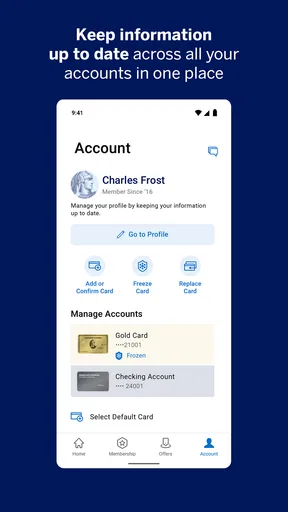
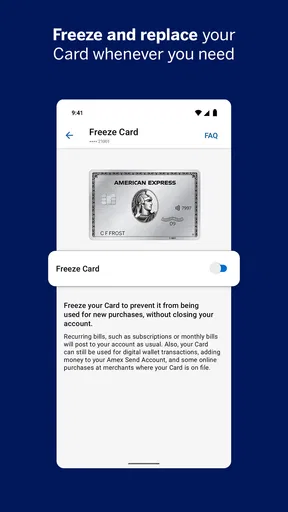
If a transaction looks unfamiliar, I would open the account and inspect its details rather than relying on a notification alone. If I had misplaced a card, the ability to freeze it is a practical first response, but I would also follow the account’s guidance for what to do next. A temporary control can help while I assess the situation; it should not be treated as a replacement for contacting the issuer when a card is lost or an account needs attention.
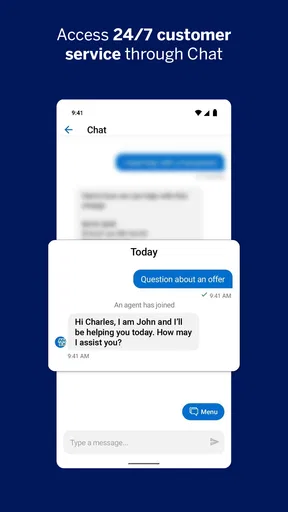
Customer-service chat can be useful when I have a question that is easier to explain in writing than over a call, especially when I want to keep the conversation alongside the account task. For an urgent matter, I would check which contact route is appropriate rather than assuming chat will be the fastest option. The useful habit is to match the channel to the problem: a quick clarification is different from a time-sensitive account concern.
First Impressions and Setup
The first thing you’ll notice about the Amex app is its sleek design. It’s got a smooth, intuitive interface that screams modern and efficient. Setting it up was a breeze. All you need is your card details and some basic personal information, and you'll be strolling through the app in no time.
One feature that immediately stood out was the biometric login. It’s a small thing, but not having to remember yet another password is a win in my book. Plus, it adds an extra layer of security, which is always reassuring.
Navigating the Features
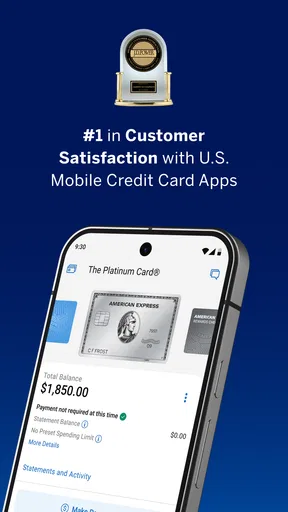
Once you’re in, the home screen becomes your financial playground. You can see your balance, recent transactions, and available credit all at a glance. It’s like having your bank statement in your pocket, just without the paper cuts.
One of my favorite features is the spending tracker. It breaks down your spending into categories like dining, travel, and shopping. It’s a real eye-opener seeing where all those dollars are slipping away. There’s even a feature to set spending alerts, which is super handy if you’re trying to stick to a budget or catch any suspicious activity.
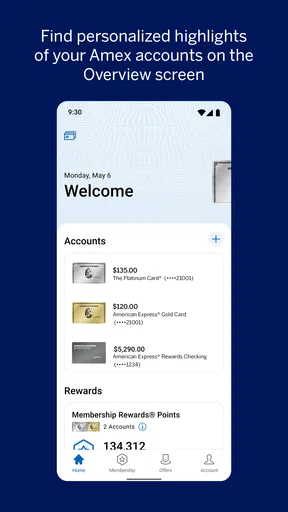
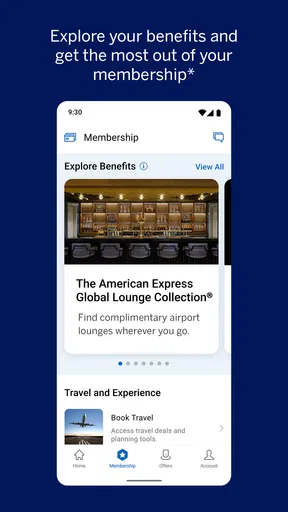
Another neat function is the rewards section. If you’re an Amex user, you know the rewards can be a sweet deal. The app lays out all your points and offers like a buffet of benefits. Whether you’re saving up for travel or looking to cash in on some statement credits, it’s all there at your fingertips.
Paying and Managing Bills
The app isn’t just about tracking; it’s also about managing. You can pay your bills directly through the app, which is a lifesaver when you’re on the go. Scheduling payments is straightforward, and you can even set up autopay to ensure you never miss a due date. Less stress, more time for the fun stuff, am I right?
Also, if you’re managing multiple cards, the app allows you to toggle between them seamlessly. It’s like having a personal assistant who doesn’t ask for a day off.
Security and Notifications
When it comes to security, the app doesn’t skimp. You’ll get notifications for purchases, which is a nifty feature to keep an eye on your card’s activity. Plus, if you ever lose your card, you can freeze it with just a tap. It’s like having a security guard in your pocket.
The app also offers a chat feature for customer service, which is super convenient. No more waiting on hold for ages; you can get your queries sorted while sipping your morning coffee.
My take on its everyday usefulness
In wrapping up, the Amex app is a powerful tool for anyone looking to keep their financial life in check. It’s user-friendly, packed with features, and offers everything you need to manage your card with ease. Whether you’re tracking spending, paying bills, or hunting for rewards, this app has got your back.
If you’re already an Amex cardholder, downloading this app is a no-brainer. It makes managing your account seamless and stress-free. And if you’re not yet part of the Amex family, this app might just be the nudge you need to join the club.
Overall, I’d say the Amex app is a solid addition to your digital arsenal, keeping everything from finances to rewards just a tap away. Happy managing!
Who I would recommend it to
I would recommend it most to people who already use an American Express card and want a focused mobile companion for account checks, payments, and rewards. The convenience is strongest when you have a concrete reason to open it—confirming a charge, checking a balance before a purchase, or handling a payment—rather than expecting it to replace every financial tool you use.
For a person who prefers managing money from a desktop, or who needs a unified view across multiple financial providers, another option may be a better primary workspace. The same is true if phone-based sign-in or small-screen navigation is uncomfortable. In that case, using a larger display or the issuer’s other account-management channels may be more practical, while the app remains available for occasional checks.
An inclusive choice, with sensible expectations
What I value most is the combination of everyday account tasks and the ability to reach them while away from a computer. Biometric access, account notifications, card controls, and written customer support can each make a different part of account management more convenient, depending on the person and situation. I would still test the screens and controls with my own device settings before relying on them for a time-sensitive task, since comfort and clarity vary from one user to another.
My recommendation is therefore specific rather than universal: if you already have an American Express account and want a phone-first way to keep tabs on it, this is a sensible app to try. If your priority is accessible interaction across a particular assistive setup, broad household budgeting, or managing accounts from several providers, check those needs against your own experience before making it your main tool. For routine card management, though, it can make the small but important jobs easier to fit into an ordinary day.
Pros
- Intuitive user interface for easy navigation.
- Comprehensive rewards tracking and management.
- Secure login with biometric options.
- Real-time notifications for transactions.
- Integration with multiple financial accounts.
Cons
- Limited features for non-cardholders.
- Occasional app crashes reported by users.
- Some features require constant internet access.
- Customer support response can be slow.
- Frequent updates may disrupt app usage.
FAQs for Amex
What features does the Amex app offer for cardholders?
The Amex app provides a wide range of features for cardholders, including real-time notifications for transactions, the ability to pay bills, view account statements, and manage card details. Users can also access exclusive offers and rewards, track their spending, and set up alerts for payment due dates, ensuring a seamless and convenient financial management experience.
Is the Amex app secure for managing my financial information?
Yes, the Amex app is designed with robust security measures to protect your financial information. It employs encryption, biometric login options like fingerprint and facial recognition, and two-factor authentication to ensure that your data remains safe. Additionally, Amex continuously monitors for suspicious activity and provides alerts to keep your account secure.
Can I use the Amex app to apply for new cards or services?
Yes, the Amex app allows you to explore and apply for new cards and services directly through the platform. You can browse various card options, compare benefits, and submit an application with ease. The app also provides personalized recommendations based on your preferences and spending habits, making it easier to find the right card for your needs.
How do I access customer support through the Amex app?
The Amex app offers multiple ways to access customer support. You can use the in-app chat feature to speak with a representative, call customer service directly from the app, or browse the extensive FAQ section for quick answers. The app ensures that assistance is readily available, providing peace of mind for any issues or inquiries you may have.
What rewards and offers can I access through the Amex app?
The Amex app provides access to exclusive rewards and offers tailored to your spending habits. You can explore cashback deals, travel discounts, and special promotions from a variety of merchants. The app also allows you to activate offers directly, making it simple to maximize your benefits and enjoy savings on everyday purchases.


